


For Oura Members who have craved the ability to glance down mid-run and see their current pace or capture their heart rate while weight lifting without their ring, the Oura App can now serve as your workout companion while you exercise—not only after you’re done.
Live activity tracking brings real-time metrics to the Oura App. Whether you’re a runner chasing a personal record, a cyclist who needs split-by-split feedback, or someone who just wants the satisfaction of watching the miles stack up as they walk, Oura is ready to move with you.
Live activity tracking will roll out starting June 4 to global Oura Members with Oura Ring Gen3 and newer generations on iOS and Android.
How Live Activity Tracking Works
Live activity tracking expands upon Oura’s foundational Automatic Activity Detection feature—think of the two as tools for different types of movement.
Now with improved accuracy for more than 40 activities including low-motion workouts like pilates and yoga, Automatic Activity Detection (AAD) is ideal for continuous movement sensing, and getting credit for every single step and calorie—even for housework or yardwork.
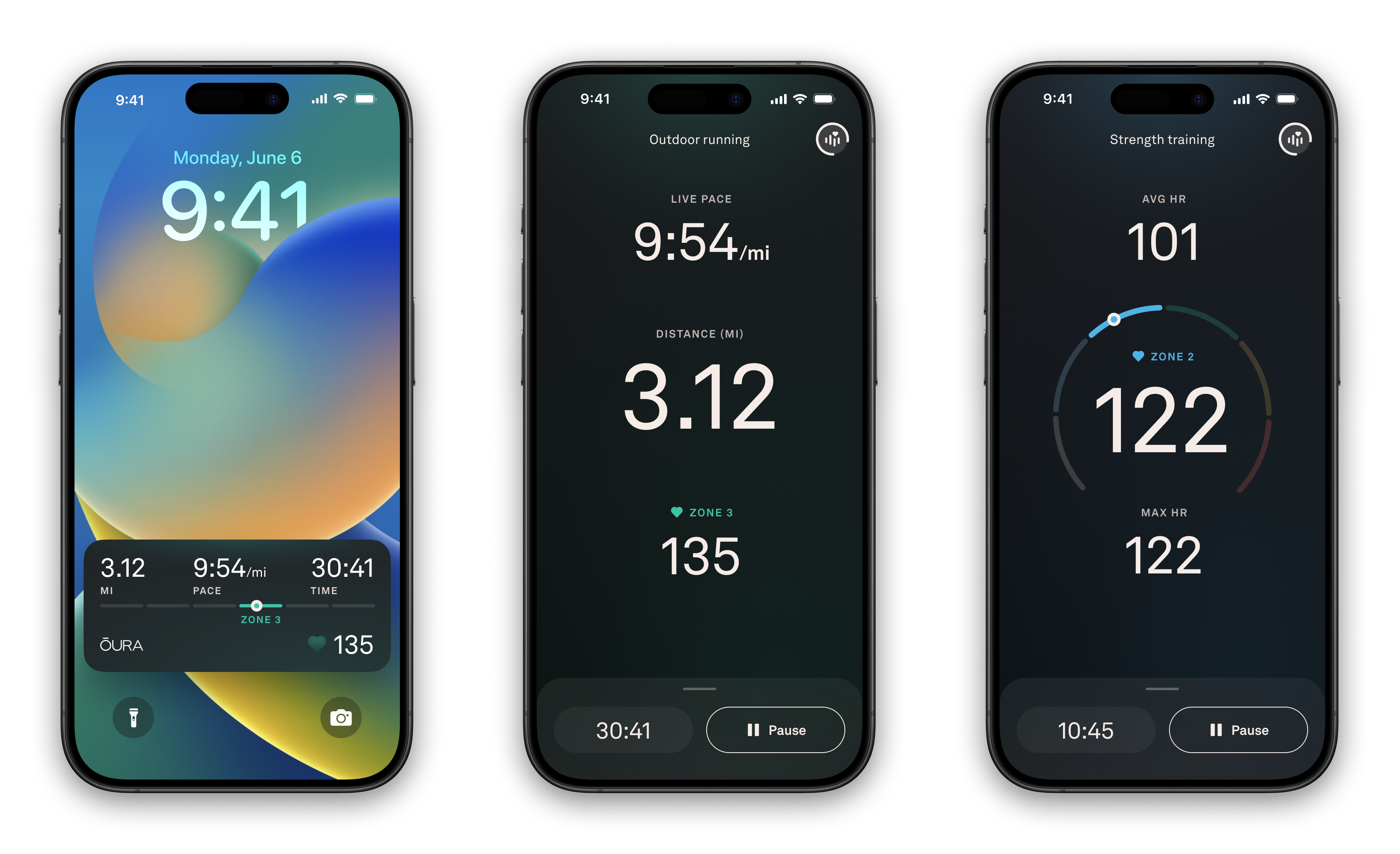
An upgraded evolution of the “Record Workout Heart Rate” feature, Live activity tracking provides a way for you to track activity on the go. When you start an activity in the Oura App, this new feature allows you to follow your key metrics in real time — including pace, distance, and heart rate — with lock screen widgets so your stats stay visible while you move.
Real-Time Heart Rate, Now Powered by Your Devices
Knowing your heart rate during a workout can be extremely helpful, no matter your fitness level. Now, you can track it even if you’re not wearing Oura Ring during your workout: Simply pair a Bluetooth heart rate monitor with the Oura App to bring live HR into your session.
The Oura App acts as a hub for all of your workout metrics, including heart rate, to bring the most context and best support your training. These metrics will also appear as lock screen widgets, so your stats stay visible while you move and make adjustments in real time.
Compatible devices include Apple AirPods Pro and any Bluetooth-enabled chest strap, such as Polar, giving you flexibility to use what you already own. Once paired, your connected device streams heart rate data directly into your workout view—showing current HR and time spent in each heart rate zone as you move.
 When you start a Live activity, you’ll see the option to add a sensor. Select your device from the list, connect, and go. Once paired, your sensor is remembered for future workouts, so setup is a one-time step. If your device disconnects mid-workout, your workout continues uninterrupted, and you’ll receive a notification with the option to reconnect.
After the workout, your summary pulls heart rate data directly from your connected device (average HR, peak HR, and a full zone breakdown). The result is a highly accurate, comprehensive picture of your cardiovascular effort.
Live activity tracking is fully integrated with the rest of your Oura data. Every live-tracked session counts toward your Activity Score, Readiness Score, step count, active calories burned, time in zones, and cardiovascular and metabolic metrics.
New Metrics in Your Post-Workout Summary
For outdoor workouts, Live activity tracking adds a dimension that ring-based wearables rarely deliver well: real-time pace and distance, connected by GPS from your phone.
During a run, walk, hike, or ride, you’ll see your current pace and total distance update as you move. On your phone’s lock screen, a widget keeps pace and distance visible without requiring you to open the app.
After the run, your post-workout summary includes:
- Your full route map drawn from GPS data
- Total time
- Total distance
- Active calorie burn
- Active time
- Average pace
- Average heart rate
- Heart rate zone summary
RELATED: What Are Heart Rate Zones?
How to Get Started
To find Live activity tracking, open the Oura App and tap the “+” icon to start a new workout. For real-time heart rate, bring your Bluetooth heart rate monitor or AirPods along and connect them during the sensor setup step before you begin.