



Knowing your Sleep Score is dipping or your resting heart rate is above average is useful. Knowing what to do about it is better.
Oura has always helped you learn more about your body. Now, Oura Advisor can also help you act on what you learn. With Advisor plans, you can turn a goal like „I want to feel more rested” or “I’d like to improve my activity levels” into a short, personalized plan built around your health data, your routines, and the realities of your day.
Personalized guidance, built around your life
Generic health advice tends to ignore your actual schedule. „Go to bed at 10pm” doesn’t help much if you work late, have kids who don’t sleep, or need that afternoon coffee.
Currently, Advisor plans are based on what Oura already knows about you: your sleep patterns, recovery, and activity trends. In the future, Advisor plans will continue to evolve to integrate more of your Oura metrics.
In addition, Advisor asks about the things that your Oura Ring can’t track, such as your lifestyle, habits, and other factors. The result is a recommendation that fits how you live, so you can actually stick with it.
How it works
1. Ask Advisor for help
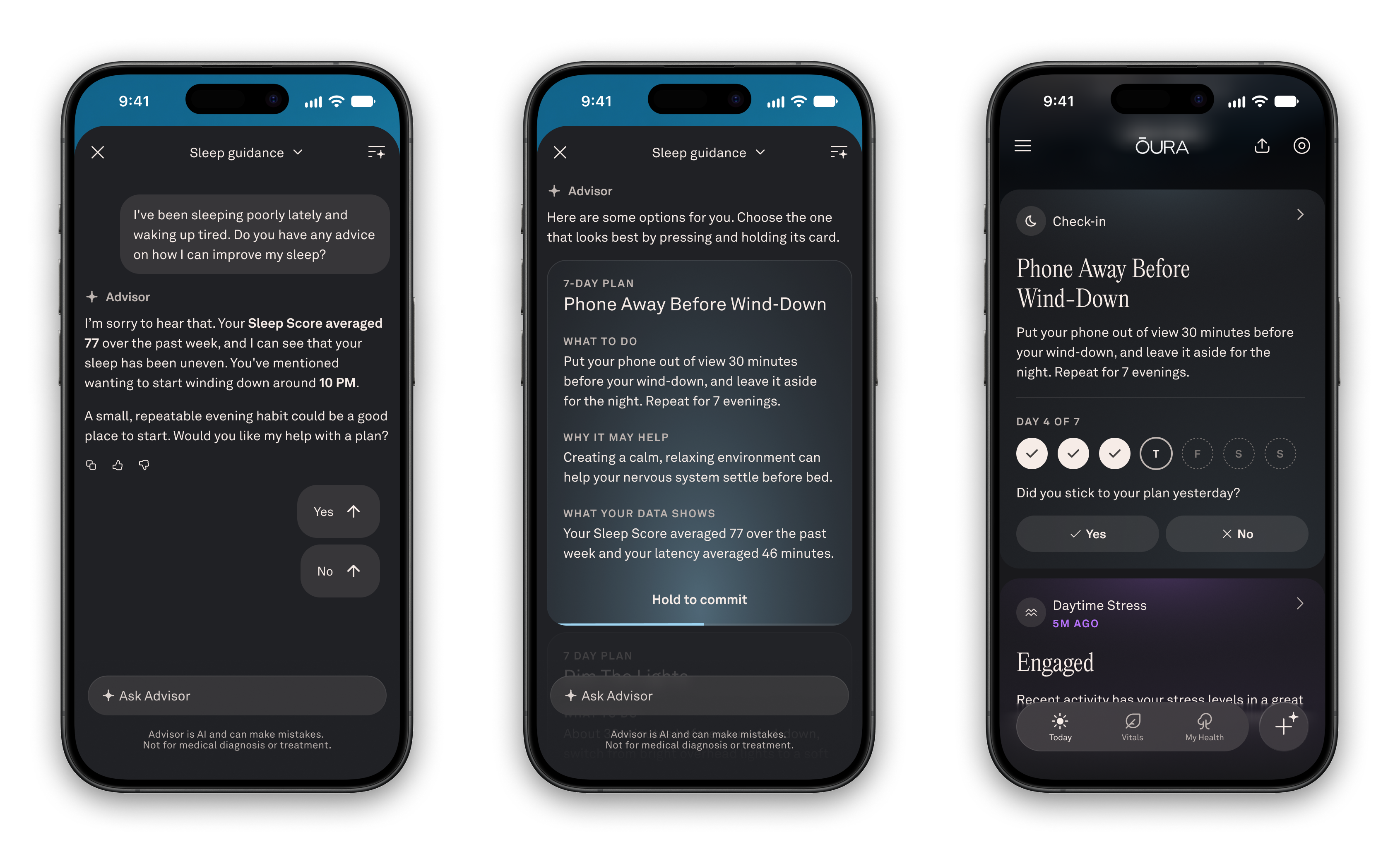
Start the way you always do. Ask Oura Advisor something like „How can I fall asleep earlier?” or „What should I do to feel more rested?” If a plan could help, Advisor will ask if you’d like to make one. You decide whether to go ahead.
2. Answer a few quick questions
Advisor uses your Oura data first, then asks up to three short questions to fill in the gaps, such as your work schedule, your kids’ bedtime, or your caffeine habits.
3. Choose the plan that fits
Advisor suggests two or three realistic options. Each one tells you:
- What to do, for example „Screens off 30 minutes before bed”
- How often to do it
- Why it fits you, based on your data and your answers
Press and hold to pick the one that feels right, and Advisor saves your plan.
4. Follow along and check in
Plans last up to seven days. Depending on the action, you might not need to do it every day. Your plan starts today or tomorrow, depending on the action and the time of day.
Checking in takes a second. Tap yes or no on the plan card in your Today tab or in Advisor. Your check-ins sync across devices.
- Daytime actions check in the same day.
- Evening actions, like an earlier bedtime, check in the next day.
- Missed a day? Advisor will prompt you to log the most recent one.
You can keep checking in after you’ve met the minimum number of days. The more you log, the more useful your summary will be.
5. Reflect on what changed
When your plan ends, Advisor helps you look back on the week: what you tried, how it went, and what changed in your data. Keep what worked, adjust what didn’t, and decide on your next step.
Smarter sleep and recovery guidance
Along with plans, Advisor’s sleep and recovery guidance is getting more specific. When you ask about sleep or Readiness, Advisor draws on models Oura has built and trained using Oura science and your data. You’ll still talk to the same Advisor, in the same Oura voice. The difference is answers that are more specific and better grounded in your own data.
Small steps, real progress
Better health rarely comes from a complete overhaul. It comes from small, realistic changes you can stick with, and from learning which ones make a difference for you. Whether you want to sleep more consistently, shift your bedtime, or build another healthy habit, Advisor plans give you a clear place to start and a simple way to see what works.
Oura Advisor offers general wellness guidance. It is not medical advice and is not intended to diagnose, treat, or prevent any condition. Talk to a healthcare professional about any medical concerns.
Frequently Asked Questions
Q: How do I create a plan?
A: Open Oura Advisor and ask how to improve something, for example „How can I sleep better?” Advisor will offer to make a plan, ask a few questions, and show you options. Hold to choose the one you want.
Q: I don’t see plans in Advisor.
A: Advisor plans are available now on iOS and Android for Oura members with Oura Ring Gen3 or newer whose app language is set to English. Check that your Oura App is on Version 7.30.0+ and your app language is English. Plans are rolling out gradually, so not everyone has them yet. A plan is only offered when your question is about a wellness goal Advisor supports.
Q: Advisor didn’t offer me a plan / just answered my question.
A: Advisor offers plans when you ask what you can do to improve something. You can also ask directly: „Can you make me a plan?” Advisor will confirm before creating one.
Q: Why is Advisor asking me questions?
A: To fit the plan to your life. It only asks about things your ring can’t measure (like your schedule), at most three questions.
Q: Where do I check in?
A: On the plan card in your Today tab (tap Yes or No), or in the Advisor conversation where you made the plan. Tapping the Today card opens that conversation.
Q: Why does my check-in ask about yesterday?
A: For evening actions like bedtime, Oura checks in the next day so you can answer after you’ve done it. Daytime actions check in the same day.
Q: I missed a day. Can I still log it?
A: Yes, you’ll be prompted to log the most recent missed day. You can’t log days that haven’t happened yet.
Q: I hit my goal early. Should I keep checking in?
A: Yes, you can keep checking in until the plan ends. More check-ins help Oura give you a more useful summary.
Q: How do I stop a plan?
A: Open the plan card in Advisor and tap Stop tracking. Check-ins and reminders stop right away.
Q: Can I have more than one plan?
A: You can have one Advisor plan active at a time. When it ends, you can repeat it or start a new one. A Jet Lag Plan can run at the same time.
Q: My plan ended and my scores didn’t change. Did it fail?
A: Not necessarily. A week is often too short for scores to move. Oura shows metric changes only when there’s enough data, and also asks how the plan felt to you. You can repeat the plan to keep building the habit.
Q: Can Advisor make me a diet, workout, weight-loss, or medication plan?
A: No. Plans focus on general wellness habits. Advisor won’t create plans for specific diets or macros, workouts with sets and reps, weight loss, medication, or treatment. Please talk to your healthcare provider about those.
Q: Is this medical advice?
A: No. Advisor offers general wellness guidance, not medical advice, diagnosis, or treatment. It uses AI and can make mistakes. If you have a medical condition or are on treatment, check with your healthcare provider. [Replace with final Legal disclaimer copy.]
Q: What data does a plan use?
A: Your Oura data and the answers you give Advisor while making the plan.
Q: Is this available in my language?
A: Not yet. Plans are currently available only when your app language is English.